A Simple System for Naming Digital Files
Use a consistent, app-independent file-naming method to make personal documents easier to recognize, sort and maintain.
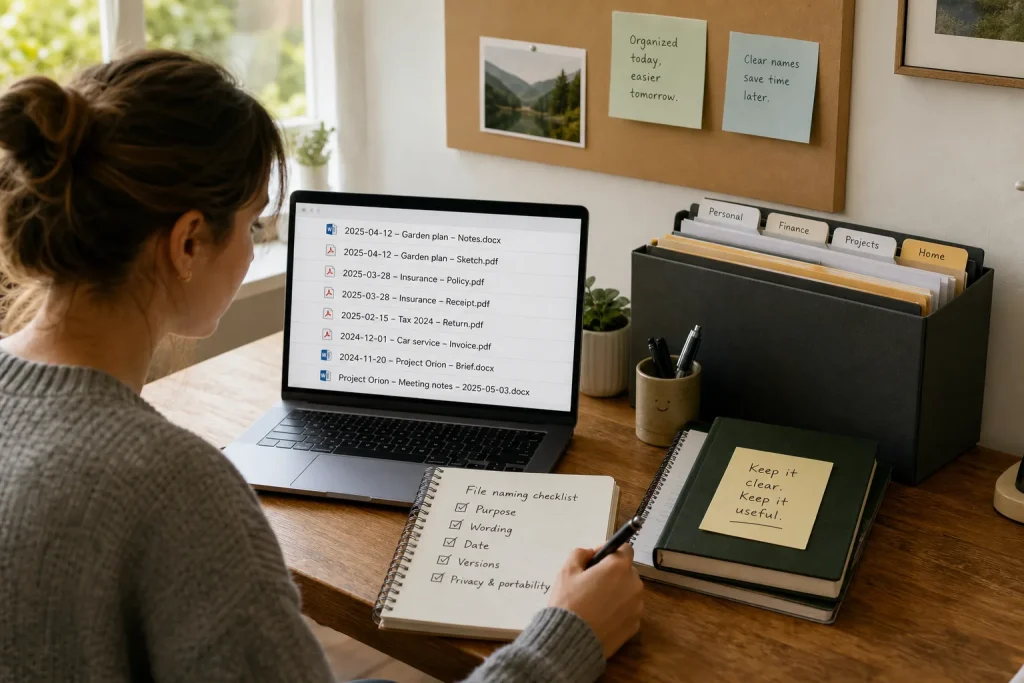
A file name is a small label with a large job: it should help you recognize what a document contains before you open it. Names such as “scan,” “notes” or “final” may make sense in the moment, but become ambiguous when similar files accumulate. A useful naming system does not need special software or elaborate rules. It needs a few stable choices about dates, subjects and versions, applied in a way that suits the files you actually keep.
The aim is not to make every name perfect. It is to make the next decision easier: which document is this, where does it belong, and is it the current version? A flexible pattern can answer those questions while still leaving room for personal habits. Avoiding common naming mistakes matters as much as choosing a format, because a tidy-looking rule is only useful if you can keep using it.
Choose a pattern that answers useful questions
Start by deciding what someone should be able to tell from a file name. For personal documents, that may be the date, the subject and the document type. A simple pattern is “date – subject – type,” with each part separated consistently. For instance, “2025-04-12 – Garden plan – Notes” signals when the file was made and what it concerns. If dates are not relevant to a particular group of files, leave them out rather than adding a field that contributes little.
Keep the pattern short enough to use without hesitation. A name that tries to record every detail can become cumbersome and harder to scan. Choose ordinary words you are likely to remember, and use the same terms for recurring topics: “insurance” rather than alternating among “policy,” “coverage” and “house paperwork” when those labels mean the same thing to you. The pattern should support retrieval, not imitate a filing system designed for someone else.
Use dates and separators consistently
When chronology matters, put the date in a year-month-day order, such as “2025-04-12.” This arrangement keeps dates in calendar order when a file browser sorts names alphabetically. Use the same date meaning throughout a group: decide whether it represents the document’s creation, the appointment, the purchase or another event. If the date is uncertain or irrelevant, omit it instead of guessing. Consistency makes the label more trustworthy than a date added simply for decoration.
Separators make names easier to read, but switching among spaces, underscores and punctuation can create visual clutter. Pick a separator that works on the devices and services you use, then apply it regularly. Keep names plain and avoid characters that may be awkward in different systems. Do not rely on capitalization alone to distinguish files, since displays and sorting can vary. The goal is a readable name that remains recognizable when moved between folders or opened on another device.
Make versions clear without calling everything final
Files that change over time need a way to distinguish drafts from completed copies. Words such as “draft,” “review” or “approved” can be useful when they describe a real status. A version label can also help, provided you update it deliberately. By contrast, “final,” “final-new” and “final-revised” quickly stop communicating which file should be used. When a document is complete, choose one clear status or date-based label and remove obsolete ambiguity when you can.
Not every edit deserves a new named version. For a working document that lives in an application with its own history, a simple subject name may be enough. For a file you send, archive or keep as a record, a date or status can prevent confusion. Do not overwrite an important original merely to make its name neater; first consider whether it needs to remain available. Naming is one part of handling files responsibly, not a replacement for keeping meaningful records.
Avoid names that depend on memory
Names such as “misc,” “stuff” and “new document” offer little help once the context has faded. So do abbreviations that only make sense to you during the task. Use enough plain-language detail to distinguish related items, but do not include sensitive information unnecessarily. A file name may appear in notifications, shared folders or search results. For private documents, identify the general subject without exposing details that do not need to travel with the file.
Another common mistake is renaming files in a large, rushed batch without checking what they contain. If two documents look similar, opening them before renaming can prevent a misleading label from becoming part of the system. Avoid changing names merely to match a new format when the old names are already clear and searchable. A practical system can be introduced gradually: use the new pattern for incoming files, then revisit older material when you have a specific reason to find or organize it.
Use a decision checklist before adopting a rule
Before settling on a format, check what information genuinely helps you identify and sort the files in a particular group. Decide whether date, subject, document type or status belongs in the name, and leave out fields that create effort without improving recognition. Confirm that the words are understandable later, that the separators are consistent, and that the name avoids unnecessary private details. Also consider whether the files are likely to be shared or moved between devices, where plain and portable wording is especially useful.
Then consider how the rule will work in ordinary use. Can you apply it quickly when saving a file? Will two related documents remain distinguishable? Does the date refer to one clearly defined event? Is a version label meaningful rather than aspirational? If the answer to a question is no, simplify the pattern before applying it widely. A short rule that survives routine use is preferable to a detailed scheme that you abandon.
- Check the purpose: Does the file name need to support recognition, chronological sorting or both? Include only the fields that serve those tasks.
- Check the wording: Would you understand the subject without recalling the original conversation or task? Replace private shorthand if needed.
- Check the date: Is the date relevant, consistently ordered and tied to a clear event? Omit it if not.
- Check versions: Does a status label distinguish an actual draft or approved copy? Replace vague “final” variations with a clear choice.
- Check privacy and portability: Does the name reveal more than necessary or rely on characters that may be inconvenient elsewhere? Simplify it before saving or sharing.
Apply the system gradually and review its fit
Begin with one recurring group, such as household records, creative drafts or appointment documents. Use the same pattern for new files in that group, and notice whether it helps you recognize them at a glance. If a field is repeatedly skipped or adds no value, remove it. If two files remain hard to tell apart, add a specific word that resolves that distinction. Adjusting a modest rule is easier than enforcing a complicated scheme that does not match your habits.
For older files, organize only when a real need arises: a search fails, a folder becomes confusing or a document is about to be shared. Rename carefully, preserve useful originals and avoid turning a quick cleanup into a reason to delay the task itself. The point is dependable access, not uniformity for its own sake. A file-naming method earns its place when it reduces uncertainty without demanding constant attention.
Hypothetical worked example
Imagine someone has several household documents saved as “scan,” “new” and “insurance final.” The person needs to find a current policy document and keep a separate record of a related call. They choose the constraint that names must remain plain and easy to sort on different devices. They open each file to confirm its contents, then rename the policy document “2025-04-12 – Home insurance – Policy” and the call record “2025-04-12 – Home insurance – Call notes.” They leave unrelated scans unchanged until there is a reason to identify them. The expected result is that the two relevant files are distinguishable by date and type, while the tradeoff is a little extra care when confirming contents and choosing labels.
A simple file-naming system is a practical agreement with your future self: use words and details that will still make sense after the immediate task is over. Choose a compact pattern, apply dates and versions only when they clarify, and protect privacy in names that might be shared. Check the rule against real needs before expanding it to every folder. With a little consistency and room to adjust, ordinary documents become easier to identify without depending on any particular app.